


Source-led route
Gaijin's FAQ documents a Linux version of War Thunder, the official Linux requirements and the available download routes. It names the game site and Steam. This article follows those pages and does not assess compatibility on any particular distribution.
RigCircuit has not tested War Thunder on Linux. Gaijin's requirements page and FAQ were checked on September 20, 2026. This article makes no performance, stability or distribution-specific claim.
Section 01
What Gaijin says exists
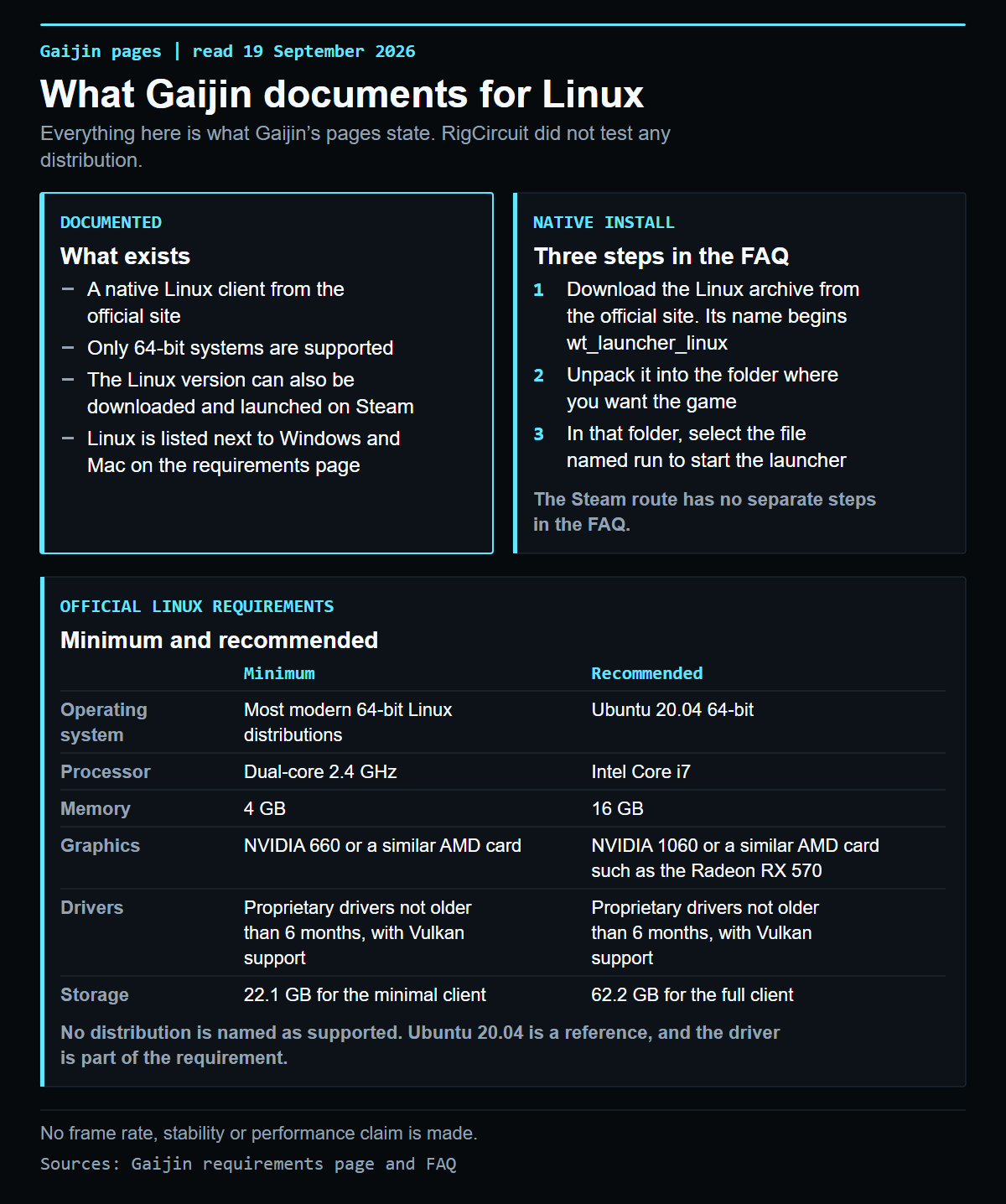
The War Thunder FAQ[2] has a section titled War Thunder version for Linux. It says the Linux version can be downloaded from the official site, that only 64-bit systems are supported and that the game can also be downloaded and launched on Steam.
The requirements page[1] lists Linux next to Windows and Mac, and describes War Thunder as a cross-platform game for Windows, Linux, Mac, PlayStation and Xbox. The original Linux announcement[3] is dated November 6, 2014. It states that only 64-bit systems are supported and that a Steam version would follow later. The page is marked as an outdated news format, so treat it as history and rely on the FAQ for the current route.
Evidence
Official Linux requirements
| Component | Minimum | Recommended |
|---|---|---|
| Operating system | Most modern 64-bit Linux distributions | Ubuntu 20.04 64-bit |
| Processor | Dual-core 2.4 GHz | Intel Core i7 |
| Memory | 4 GB | 16 GB |
| Graphics | NVIDIA 660 or a similar AMD card, with proprietary drivers not older than 6 months and Vulkan support | NVIDIA 1060 or a similar AMD card such as the Radeon RX 570, with proprietary drivers not older than 6 months and Vulkan support |
| Minimum resolution | 720p | Not separately specified |
| Network | Broadband connection | Broadband connection |
| Storage | 22.1 GB for the minimal client | 62.2 GB for the full client |
Gaijin does not attach a frame rate or graphics preset to either column. The page labels the two sets of specifications "Minimum" and "Recommended" and gives no game performance result.
The minimum operating system row says "Most modern 64-bit Linux distributions." The recommended row names Ubuntu 20.04 64-bit. Gaijin does not name a specific distribution for every configuration. Both graphics rows require proprietary drivers no older than six months and Vulkan support.
Action plan
Installing the native client
The FAQ describes the install route for the native client in three steps:
- Download the Linux archive from the official site. It is a compressed file whose name begins with wt_launcher_linux.
- Unpack the archive into the folder where you want War Thunder to live.
- Inside that folder, select the file named run and launch it. The game launcher starts.
The FAQ also says that if a version does not work, you need the most recent proprietary drivers for your video card.
Action plan
Installing through Steam
The FAQ states that the Linux version can be downloaded and launched on Steam. It gives no separate steps for this route, so none is added here. Use the Steam library for the game and check its store page on the day you install.
Action plan
What to check before you install
- Your system is 64-bit, since Gaijin supports only 64-bit systems.
- Your graphics card and its proprietary driver meet the graphics row, including Vulkan support.
- Your memory and free space match the minimal or full client figures above.
- The download links still exist on the FAQ and requirements pages, since neither shows a date.
Evidence
Windows requirements and scope
The client, the Steam route, the requirements and the install steps that Gaijin documents are the only subjects here. The Windows specification is in War Thunder PC requirements. Nothing here covers performance or troubleshooting.
Evidence record
Sources
- War Thunder about the game, system requirements[1], Gaijin Entertainment, checked September 19, 2026.
- War Thunder FAQ, War Thunder version for Linux[2], Gaijin Entertainment, checked September 19, 2026.
- War Thunder is now available on Linux![3], Gaijin Entertainment, November 6, 2014, checked September 19, 2026.
Publication record
Keep the decision trace visible
This route passed its publication checks. Future reviews must reconfirm the source date, game build, media rights and reader action.
- Confirm the source. Recheck the linked primary or authoritative page.
- Confirm the media. Keep the approved WordPress path and rights note attached.
- Confirm the next move. Give the reader a clear action without inventing a test.
Evidence library
Sources checked for this article
This library preserves source titles, publishers and check dates. Original URLs remain in the editorial record.
- War Thunder about the game, system requirementsGaijin Entertainment, warthunder.com · Checked September 20, 2026Reference on file
- War Thunder FAQ, War Thunder version for LinuxGaijin Entertainment, warthunder.com · Checked September 20, 2026Reference on file
- War Thunder is now available on Linux!Gaijin Entertainment, warthunder.com news · Checked September 19, 2026Reference on file

Keep exploring
Related articles


Read next
Continue with the next route
