


Source-led route
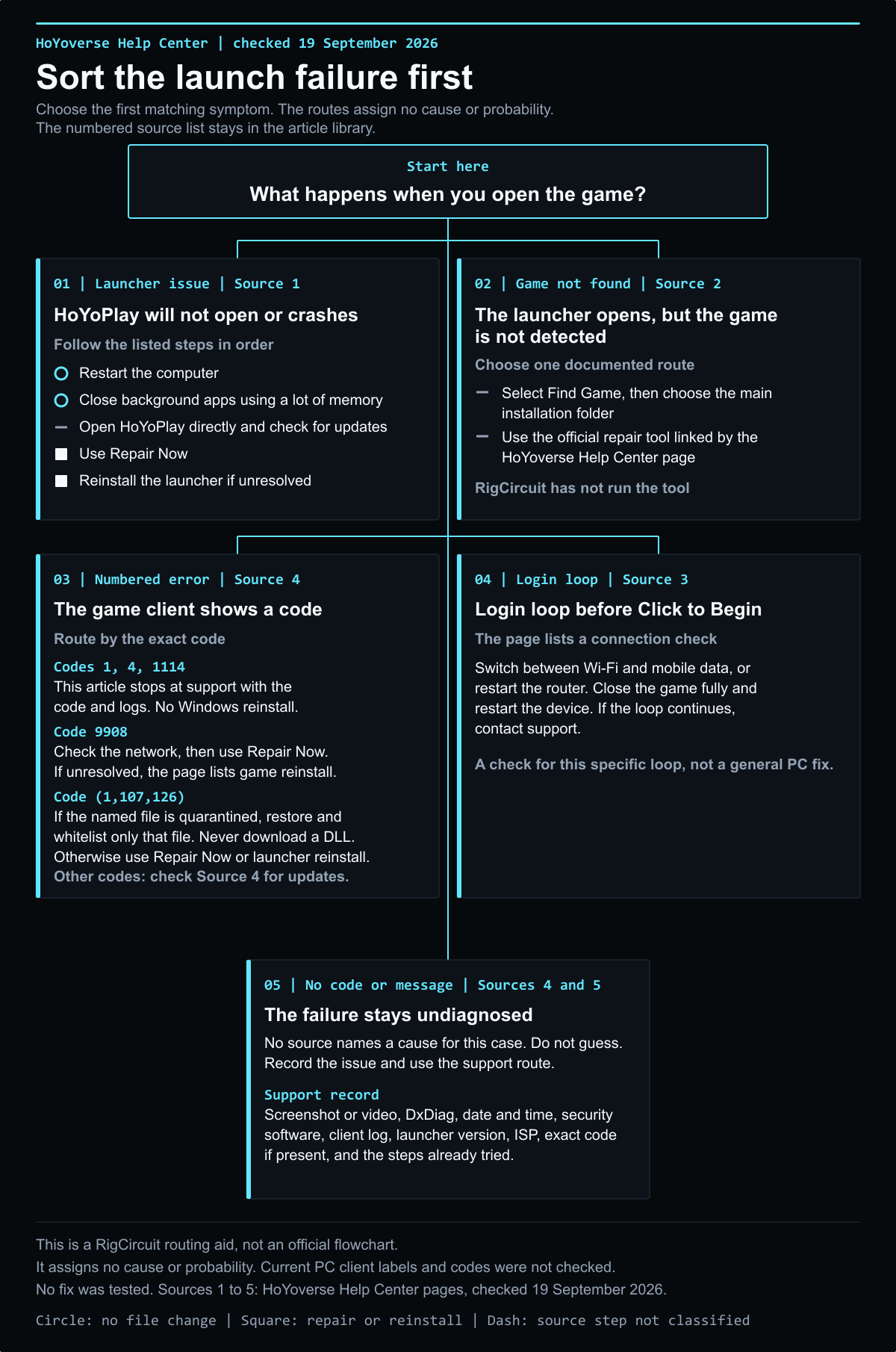
A launch failure can mean that HoYoPlay will not open, that it cannot find an existing game installation, or that the launcher opens but the game client does not start. Those cases need different support information.
This page summarizes the current HoYoverse Help Center guidance checked on September 20, 2026. It does not infer a cause from an error number or claim that a step repairs every PC.
Evidence record
Record the failure before changing anything
Write down whether the launcher itself opened, what happened after you selected the game, the exact message on screen and when the problem began. Keep a screenshot or video if one is available.
HoYoverse asks for a description of the problem, the error message, DxDiag information, the date and time, security software, client logs, launcher version and internet service provider when reporting persistent launcher issues. Use the current support page for its latest submission instructions.
Section 02
If HoYoPlay will not open or shows an error
HoYoverse's launcher page lists restarting the computer, closing memory-heavy background applications, checking for launcher updates, using its repair function and reinstalling the launcher. The page presents these as initial troubleshooting steps. This article does not add button names or a current menu path because the installed launcher was not checked.
If the launcher still fails, follow the Help Center's current support instructions and include the evidence you recorded.
Action plan
If HoYoPlay cannot find an existing installation
HoYoverse has a separate page for a launcher that does not detect an installed game. It describes a manual locate process and an official repair tool. The article does not reproduce launcher button labels or link to a repair download. Follow the current instructions on HoYoverse's page and use only the download it provides.
This case is different from downloading Genshin Impact for the first time. Use the Genshin Impact PC download checklist for a first-time download and the Genshin Impact launcher update checklist for an update issue.
Section 04
If the game client does not start
First compare the PC with HoYoverse's Genshin Impact PC requirements. A requirements comparison does not identify the cause of a launch failure, but it can show whether the device meets the published floor.
If an error code appears, record it exactly and use the matching current HoYoverse support page. This article does not list or interpret codes. If the game closes, freezes or continues to fail, use the official troubleshooting page for crashing or freezing and include the PC details and logs it requests.
Section 05
What this page does not cover
This is a source guide to HoYoverse's launcher and PC support pages. RigCircuit did not install the game, test a repair tool, or verify an error against a current client build. The article does not give a rollback procedure, download size, installer name or repair result.
Evidence record
Sources
- What should I do if the HoYoPlay launcher crashes or shows an error? HoYoverse Help Center, updated September 17, 2025, checked September 20, 2026.
- What should I do if the HoYoPlay launcher cannot locate my installed game? HoYoverse Help Center, updated November 11, 2025, checked September 20, 2026.
- What should I do if my Genshin Impact is crashing, lagging, or freezing? HoYoverse Help Center, updated October 23, 2025, checked September 20, 2026.
- What are the system requirements to play Genshin Impact? HoYoverse Help Center, updated November 11, 2025, checked September 20, 2026.
- What information should I provide when reporting launcher issues? HoYoverse Help Center, updated November 10, 2025, checked September 20, 2026.
Publication record
Keep the decision trace visible
This route passed its publication checks. Future reviews must reconfirm the source date, game build, media rights and reader action.
- Confirm the source. Recheck the linked primary or authoritative page.
- Confirm the media. Keep the approved WordPress path and rights note attached.
- Confirm the next move. Give the reader a clear action without inventing a test.
Evidence library
Sources checked for this article
This library preserves source titles, publishers and check dates. Original URLs remain in the editorial record.
- What should I do if the HoYoPlay launcher crashes or shows an error?HoYoverse Help Center, Genshin Impact · Checked September 20, 2026Reference on file
- What should I do if the HoYoPlay launcher cannot locate my installed game?HoYoverse Help Center, Genshin Impact · Checked September 20, 2026Reference on file
- What should I do if my Genshin Impact is crashing, lagging, or freezing?HoYoverse Help Center, Genshin Impact · Checked September 20, 2026Reference on file
- What are the system requirements to play Genshin Impact?HoYoverse Help Center, Genshin Impact · Checked September 20, 2026Reference on file
- What information should I provide when reporting launcher issues?HoYoverse Help Center, Genshin Impact · Checked September 20, 2026Reference on file

Keep exploring
Related articles


Read next
Continue with the next route
